Setup and progression
Azeroth Survivors save location: Windows folder and automatic backups
Use the game’s export and import for a move between computers. The Windows folder below is player-reported; browser progress is not a universal desktop save file.
On this page
Where is the Windows save folder?Browser progress and moving computersHow do automatic backups work?What if progress is overwritten or missing?Sources & scopeWhere is the Windows save folder?
In the original launch discussion, u/CrankyD reports the folder below. Its shorthand can be entered in Windows File Explorer’s address bar. This is a community report, not a Windows-client check by us, and may differ between releases.
%APPDATA%\wenilla-rogueThe usual expanded form:
C:\Users\<username>\AppData\Roaming\wenilla-rogueIf it is absent, use the in-game export rather than overwriting guessed folders. Keep a separate untouched copy before changing files.
Browser progress and moving computers
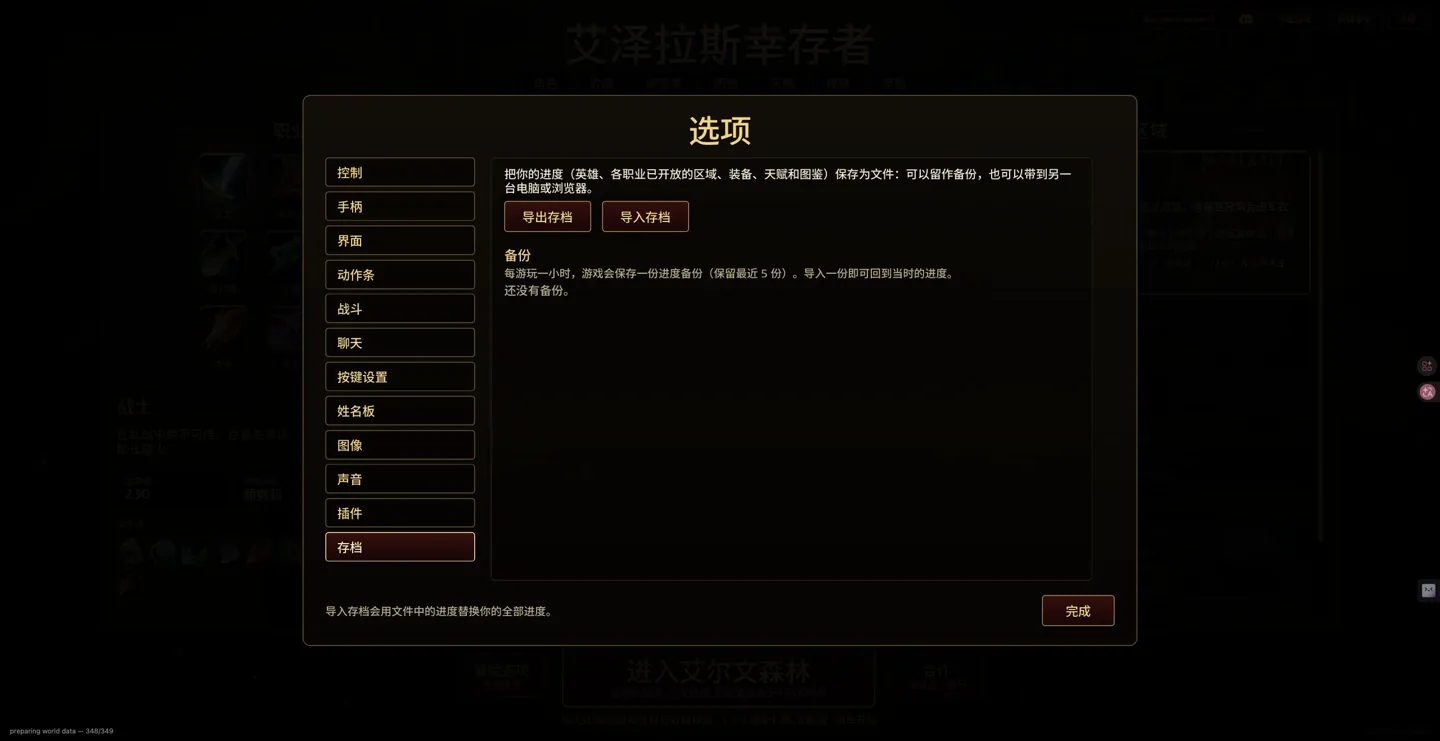
Options → Saves says an export includes heroes, class zone unlocks, equipment, talents and the codex, for backup or transfer to another computer or browser. Export the source, back up the destination, then import there. Import replaces all progress; it is not a merge or automatic cloud sync.
How do automatic backups work?
The current menu says a backup is kept after each hour of play, retaining the latest five. Importing one returns to that recorded progress. A fresh character shows no backups, so do not assume a recovery file already exists. Five is a count of backups, not five days.
What if progress is overwritten or missing?
- Stop repeated imports and keep a copy of the current state.
- Check the original browser, site address and browser profile before assuming another environment contains the same progress.
- Check your exported files and the in-game automatic backups.
- Keep separate files before and after an update. This guide cannot recover deleted progress without a backup or guarantee every cross-version combination.
Original menus checked October 25, 2026: v0.115.0 (6d1c4473). Menu observations and community reports are labelled separately. These notes do not import rules from WoW add-ons, community rebuilds or older videos.
FAQ
Does importing merge two computers’ progress?
No. The original menu says importing replaces all progress. Export the destination first.
Should I use a third-party save editor?
Third-party editors and their paths were not verified here. Prefer original export/import and keep an untouched copy.
Sources & scope
Independent guide. Not affiliated with Aethus or Blizzard Entertainment.